IMPORTANT

Who is selected for high usage post-enrollment verification?

CARE and FERA participants whose energy usage exceeds:

  • 400% of their Baseline Allowance
  • 3 times
  • In a 12-month period

CARE participants: You must enroll in the Energy Savings Assistance (ESA) program.

To continue receiving the CARE discount on your monthly energy bill, the California Public Utilities Commission (CPUC) requires that all CARE high usage customers participate in the ESA program.

  • The program helps participants stay below 400% of their Baseline Allowance.
  • The program provides energy-efficient home improvements at no cost.
  • This is a CPUC requirement.

  Note: FERA customers are not required to participate in ESA.


    What is post-enrollment verification (PEV)?

    We do not require you to submit proof of eligibility when you apply for CARE or FERA. However, you may be required to verify your eligibility after enrollment. This is called post-enrollment verification (PEV).


    Ways to verify your eligibility:

    1. Provide a letter showing that you or someone in your household participates in one of the qualifying public assistance programs.
      OR
    2. Provide proof of household income.
      OR
    3. If no one in your household participates in a qualifying public assistance program, and no one in your household has any income, submit a completed Affidavit of Zero Income form with your completed high usage PEV form.

    emergency alert Important: If we do not hear from you by the date specified in the email or letter, your discount will be removed.

    How do I complete high-usage post-enrollment verification?


    There are two ways to complete this verification—online (quickest) or by downloading the forms:

    Complete your high usage PEV form online

    1. Find the CARE or FERA PEV letter or email from PG&E.

    You must submit your forms by the due date indicated in the letter or email.

    2. Create or log into your online account.

    Go to My Account by selecting the Sign In. If you don't have a pge.com account, you'll be prompted to create one.

    3. Find and select the link to the PEV form.

    The link to the PEV form should be easy to find in an alert bar at the top of your dashboard.

    4. Fill out all required fields and confirm your information.

    Once you've filled out all required fields, select Next. You will be prompted to review and verify your information.

    5. Upload your documents.

    Simply drag or drop your documents or use the Upload Files link. You can take photos of the documents with your cell phone and upload them as jpegs. Select Next.

    6. Complete a final review and submit.

    You can log into your account and check the status of your post-enrollment verification by selecting the alert notification.

    Download, complete and sign your high usage PEV forms

    1. Download the high usage PEV forms.

    Forms are available in various languages.

    2. Complete and sign the form.

    • If someone in your home gets public assistance: Write down only that person's name. Send proof that they are in the program.
    • If no one in your home gets public assistance: Write down everyone who lives with you, including yourself. Next to each name, write how much money that person makes.
    • If no one receives public assistance or has income: Fill out the Affidavit of Zero Income form and sign it. Send it with your signed PEV form.

    3. Submit your documents.

    You can submit your documents in the following ways:

    • Online
    • By mail or fax
    • By email


    How do I submit the high usage PEV documents?

    If you see a red alert banner when you sign in:
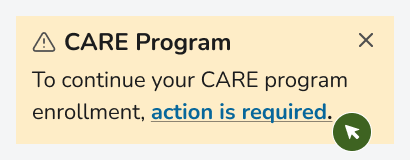
    • Select the "action is required" link in the banner.
      select CARE action is required linkselect FERA action is required link

    If you DON'T see a red alert banner when you sign in:

    1. Go to the My Account dashboard.
    2. Under "Payments," select "All payment tasks."
    3. Select "Assistance programs."
    4. Under "CARE/FERA," select "Learn more about CARE/FERA and apply."
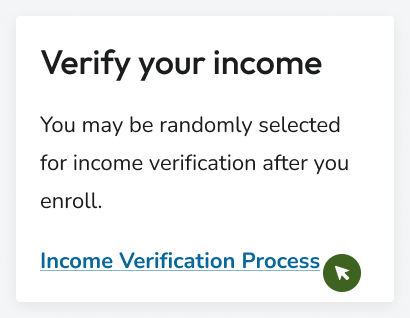
    5. Under "Verify your income," select "Income Verification Process."
      verify your imcome

    Mail or fax the completed, signed and dated high usage PEV form, plus all income verification documents or a letter of proof of public assistance dated within the last year to:


    PG&E CARE/FERA program
    P.O. Box 29647
    Oakland, CA 94604-9647


    Fax: 1-877-302-7563

    Email the completed documents to CAREandFERA@pge.com.


    Write "CARE/FERA PEV" in the email's subject line. Remember to attach your:

    1. The completed, signed and dated PEV form
    2. Your CARE or FERA eligibility documents
      • Letter of proof of public assistance dated within the last year or
      • Income verification documents

    Still have questions about post-enrollment verification?

    More resources and support

    Energy Savings Assistance (ESA)

    Is your house at least five years old? Explore no-cost home energy improvements for income-qualified homes.

    Medical Baseline

    Do you rely on power for certain medical needs? You could qualify for more energy at the lowest price on your current rate.

    Budget Billing

    Budget Billing is a free tool that averages your annual energy costs to help you manage your bills.

    • Level out monthly payments.
    • Offset high seasonal bills.

    Low-Cost Home Internet

    Some Internet Service Providers (ISPs) offer discounted broadband plans for eligible customers, based on household income, participation in assistance programs, and more.


    Call 1-844-926-4106 for more information about providers in your area.

    Discounted phone service

    You may qualify for discounted phone service. California LifeLine is based on your income level or program participation.